


What 'Forward Visibility' Looks Like Inside a Modern WSSI
.png)
More articles:
.png)
.png)
.png)







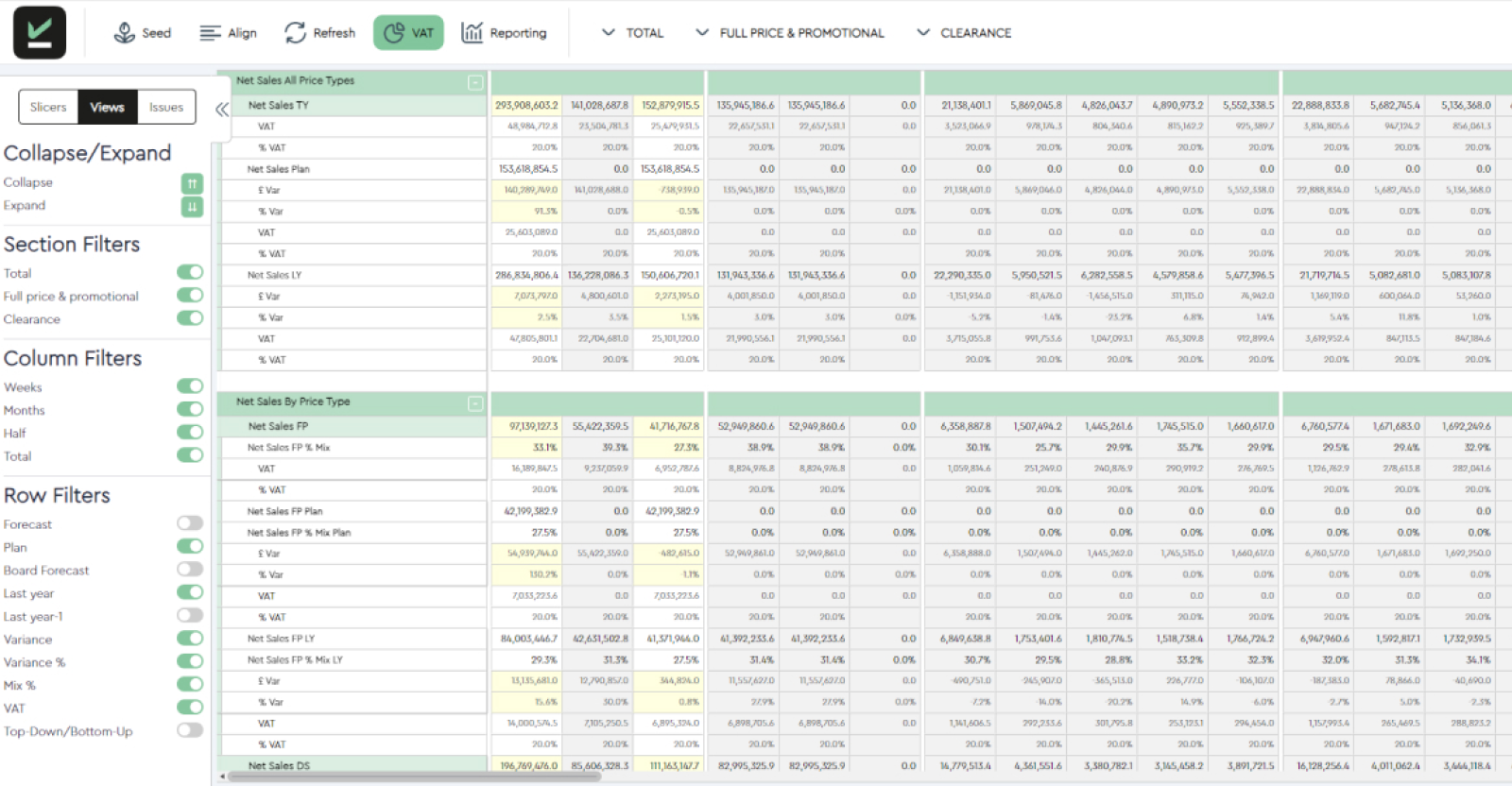

A WSSI file can be completely up to date and still tell a trading team almost nothing about what happens next. Sales, stock and intake are reconciled for last week. The plan for the weeks ahead rests on assumptions nobody has stress tested since the file was drafted.
That gap, between holding a weekly file and having real forward looking retail planning, is where most of the commercial risk in weekly trading sits.
This article is written for WSSI retail planning teams who already know the basics. It sets out the specific capabilities that turn a WSSI report into a usable forward view.
Key Takeaways
- A modern system joins actuals and forecasts in one place, not just last week's confirmed numbers.
- It connects top-down strategic targets with bottom-up trading forecasts so gaps are visible early.
- It lets users move between the total business view and specific hierarchy or channel detail without losing the overall picture.
- It surfaces exceptions and priorities instead of requiring a full manual review every cycle, giving teams time to act before the commercial window closes.
What WSSI Means in Modern Retail Planning
WSSI stands for weekly sales, stock and intake. In WSSI retail planning, it's the file that tracks a product range against plan, usually alongside an open to buy (OTB) position. The original purpose of an WSSI was to answer one question: is the business on track?
A modern WSSI is expected to answer a harder question: where is trading going, and what needs to change before next week? That requires a live forward view, not a completed record of what already happened.
Five Core Capabilities of a Forward-looking WSSI
A modern WSSI is only considered as forward looking when it lets users see likely outcomes across the coming weeks, not just confirm what already happened. More importantly, it translates that view into a specific decision rather than another report to interpret.
The five capabilities below demonstrate what a modern WSSI looks like in practice:
1. One view of sales, stock, intake, margin and OTB
Actuals, plans and forecasts for sales, stock and intake sit in the same workspace, with OTB alongside them.
A merchandiser can see where the current plan will create excess stock, a shortage or a missed opportunity before the next month confirms it. This means they can reforecast, revise intake, protect a strong line or redirect investment from the same screen.
2. Top-down and bottom-up forecasts side by side
The strategic company target sits next to the working forecast built by the merchandising team. When the two disagree, the gap is visible immediately rather than emerging in a monthly review.
The question is then straight forward: has trading moved, is the working forecast wrong, or does the strategic target need revising?
3. Drill down and roll up across hierarchy and channel
A total that looks healthy can hide a problem in a single channel, region or product group. Users need to move from a company view into category, territory or channel detail, and see any change roll back up to the total in real time.
A category dip driven by one weak channel needs a channel-specific fix. Without this capability, teams incorrectly apply a company-wide response to a local problem or even worse, they miss the problem entirely.
4. Forecasts, benchmarks and flexible seeding
Smart forecasts give planners a credible starting point built from historic patterns, benchmarks, strategic plans or comparable products.
Flexible seeding provides a credible starting forecast that can be adjusted at any level of granularity and benchmarked against system-generated forecasts, strategic plans and historic performance.
The result is speed without losing control: a planner can create or revise a forecast quickly from a sensible starting point, rather than building one from scratch every cycle, while maintaining visibility of the initial plan.
5. A priority dashboard that surfaces what needs attention
The weekly meeting should not begin with a full line-by-line review.
A priority dashboard should surface the categories and lines with the most urgent commercial risk, with suggested actions alongside them.
Fast recalculation means a team can test a change in intake or forecast and see the effect on stock, OTB and the total plan before committing.
Forward Visibility In Action
We’ve covered the capabilities that a modern WSSI includes, but what benefits does this deliver to the wider retail planning team?
Joined Sales, Stock, Margin and Intake View
When you have access to actuals, plans and forward forecasts across future weeks, alongside OTB and relevant KPIs in the same context, you can quickly identify whether your current plan is likely to create excess stock, shortages or missed sales opportunities. This joined-up view gives planning teams the insight needed to reforecast sales, revise intake, protect product availability or redirect investment before issues impact performance.
Top-Down and Bottom-Up Planning
By viewing strategic targets alongside the latest operational forecasts from each team, businesses can clearly see where planning assumptions diverge. This makes it easier to understand why forecasts may not align with company objectives and determine the best course of action, whether that means accepting the variance, adjusting the working forecast or revising strategic targets to reflect changing market conditions.
Planning at Any Level
The ability to analyse performance across company, product hierarchy, territory and channel levels provides a comprehensive view of the business. With drill-down capabilities and real-time roll-ups, planners can quickly determine whether an issue is widespread or isolated to a specific area, enabling them to take targeted action at the appropriate level while understanding the impact on the wider business.
Smart Forecasts and Flexible Seeding
Forecasting becomes faster and more reliable when teams can build projections using historic patterns, benchmarks, strategic plans or comparable products, while still incorporating user adjustments where necessary. This helps establish the most credible starting forecast and provides transparency around the assumptions driving the final figures, enabling planners to create or revise forecasts quickly without losing commercial control.
Focused Planning Views
Rather than overwhelming users with unnecessary information, focused planning views present only the KPIs, benchmarks and time periods that are most relevant to a user's role or current task. This enables decision-makers to concentrate on the measures that matter most, assess performance more efficiently and spend less time manually preparing reports or searching for the right data.
Priority Dashboard
A priority dashboard highlights the categories, actions and indicators that require immediate attention, helping teams focus on the areas likely to have the greatest business impact. By quickly identifying where limited review time should be spent, organisations can move away from blanket reviews and adopt a more efficient, exception-based approach to planning and decision-making.
Fast Recalculation and Scenarios
When a planning assumption changes, understanding the knock-on effects can be both time-consuming and complex. Fast recalculation and scenario planning allow teams to instantly see the impact on stock, intake, OTB and the overall plan across all dependent fields and planning levels. This makes it easier to test potential interventions, compare alternative scenarios and make informed decisions with confidence before committing to a course of action.
What Forward Visibility Changes in Trade Meetings
Once forward-facing visibility is achieved, the ripple effect of benefits not only impacts the planning team, but can be felt across the wider business. To put this into context, let’s talk through four distinct situations that show the difference most clearly.
- When demand weakens while intake is enroute, a unified trading view exposes the impact of committed orders against a lower forecast before stock arrives. This enables an immediate decision to reduce, delay, or redirect part of the order.
- When a strong category total masks a weak channel, drilling down reveals online sales underperforming while stores cover the gap. This drives a targeted channel response rather than an unnecessary blanket correction.
- When operational forecasts diverge from the budget, holding both views side by side highlights the variance early. Teams can then decide whether to accept the gap, adjust the working forecast, or flag the target for review.
- When capital needs reallocating to top performers, fast recalculation models the effect of shifting open-to-buy from a slower category to a faster one, allowing the change to be tested before committing spend.
Ultimately, the difference between a legacy spreadsheet and a modern WSSI is not just visual polish. Why the WSSI still matters is that a connected workspace changes what is possible in a weekly trade meeting, not just how the file looks.
Legacy Versus Modern WSSI
Tailored Views Across the Business
A commercial director or CFO needs the total business view: where forecast and budget diverge, and the size of the risk or opportunity, without needing every line behind it. A merchandising director needs enough hierarchy and channel detail to direct the team's attention. Working planners need the granular, item level view where the forecast is actually built and adjusted week to week.
Each role should work from a single source of truth. That is part of what retail planning solutions built around a shared planning workspace are designed to support, rather than leaving each stakeholder to reconcile their own version before a meeting.
What Should Buyers Look for in WSSI Software?
A structured evaluation is more useful than a feature list. When comparing WSSI software, check whether a system can show:
- Integration with current sales, stock and intake actuals, not a delayed or manually refreshed extract
- Configurable KPIs and multiple benchmarks relevant to each role, not one fixed report layout
- Top-down and bottom-up forecasts held together, with variances visible rather than reconciled by hand
- Planning by hierarchy and channel, with real time drill down and roll up
- Scenario modelling fast enough to test a decision in a meeting, not overnight
- User control over forecast assumptions and adjustments, with a visible record of changes
- Action prioritisation that highlights exceptions rather than requiring a full manual review
- A realistic implementation fit for current systems and team, not a rebuild of every process at once
PlanIT Retail's WSSI is built to answer each of these directly, from real time roll ups and fast field recalculation to a priority dashboard and configurable planning views, evidenced by WSSI customer examples including OKA and Majestic Wines.
Elevate Your Weekly Trading Performance
Forward visibility means looking ahead, not just reading reports. It helps you track sales, stock, margin and intake overcoming weeks, spot variances early, and adjust course before it is too late.
A weekly file that only looks in the rear-view mirror cannot do that, no matter how clean it looks.
PlanIT brings commercial, merchandising, and finance teams into a single, collaborative workspace, replacing disconnected spreadsheets with a unified view of your business. By integrating live sales, forward stock projections, and inbound intake, PlanIT aligns your top-down financial budgets with bottom-up trading forecasts in real time.
When variances or emerging stock risks appear, PlanIT automatically surfaces these exceptions on an intuitive priority dashboard. This allows your team to test what-if scenarios, adjust open-to-buy budgets, and rebalance stock across channels all within the same session, ensuring every decision is made with complete forward visibility before trading windows close.
To see what this could look like for your business, our benefit calculator will help you estimate the financial impact of amore connected planning process. For more information on how this works with your own retail planning data, request a WSSI demo.
Frequently Asked Questions
What does WSSI stand for in retail?
WSSI stands for weekly sales, stock and intake, the planning file retailers use to track sales, stock and intake for a range or category, alongside an open to buy position.
What should a WSSI report include?
A typical report should include sales actuals and forecasts by week, stock on hand and cover, planned and actual intake, and an OTB position, all at a consistent level of the product hierarchy so the numbers can be compared. Modern WSSIs often include margin projections, though some older solutions require margin to be tracked separately.
How is a WSSI different from open to buy?
OTB is the budget for future purchasing, the amount a category can still buy within its plan. A WSSI is the wider file that tracks sales, stock and intake together, typically showing OTB as one part of that view.
What makes a WSSI forward looking?
It becomes forward looking when it joins actuals with live forecasts, holds top-down and bottom-up plans together, allows drill down and roll up by hierarchy and channel, and surfaces exceptions early enough for a team to act.
Can WSSI software plan across stores, ecommerce and territories?
Yes, a modern system should support planning across trading channels and territories as well as product hierarchy, with the ability to drill into a specific channel or region and see the effect roll back up to the total business view.


Contact Us
If you’d like to request a demo or find out more about the products and services we offer, we’d love to hear from you. Leave your details in the form below and we’ll get back to you.